GitHub Commits
Promptless can monitor direct commits to your default branches for documentation updates. This is useful for teams that merge changes directly without pull requests, or when you want to capture documentation needs from hotfixes and emergency changes.
How It Works
When a commit is pushed directly to a monitored branch:
- Commit Detection: Promptless receives notification of the new commit
- Analysis: The system processes the code diff and commit message to understand the changes
- Relevance Assessment: Promptless determines if the changes require documentation updates
- Suggestion Creation: If relevant, Promptless creates documentation suggestions
Configuration
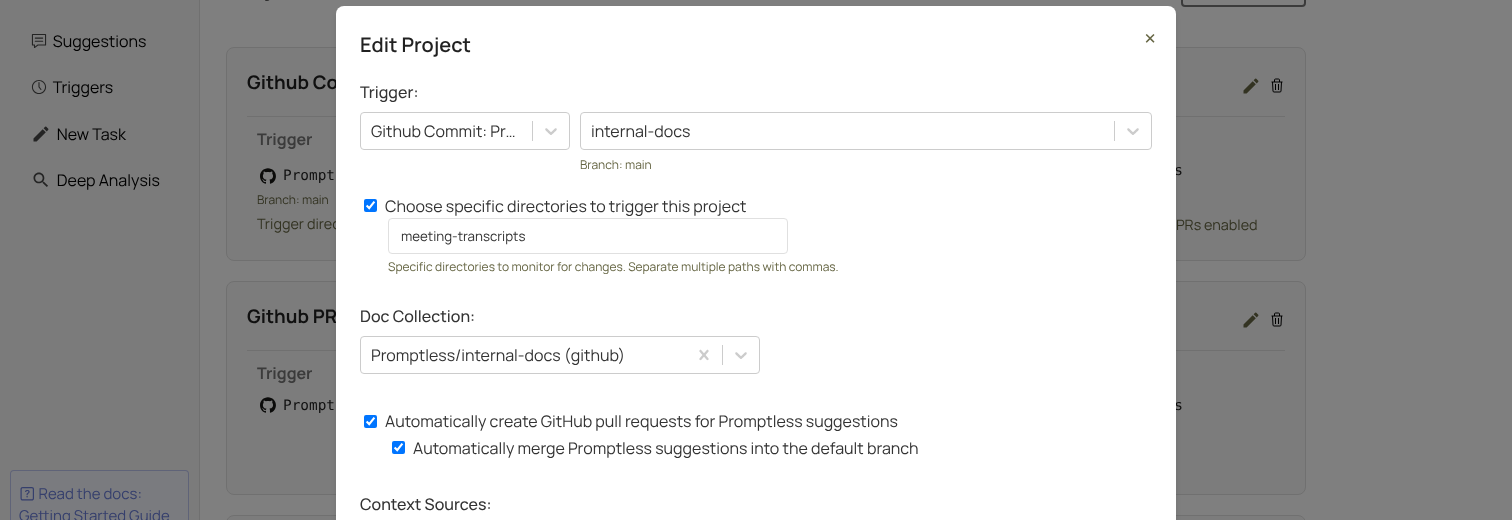
Configure GitHub commit triggers in your project settings:
- Select GitHub as your trigger source
- Choose “GitHub Commits” as the trigger type
- Select which repositories and branches to monitor
- Optionally configure directory-specific triggers
- Set auto-publish preferences

Directory-Specific Commits
Similar to PR triggers, you can configure Promptless to only trigger on commits that affect specific directories. This is particularly useful for monitoring changelog directories or specific feature areas.
When trigger directories are specified, only commits that contain changes to those directories will trigger documentation updates.
Use Cases
GitHub commit triggers are especially useful for:
- Changelog Monitoring: Automatically update documentation when changelog files are modified
- Hotfix Documentation: Capture documentation needs from emergency fixes that bypass the normal PR process
- Direct-to-Main Workflows: Support teams that commit directly to main branches
- Automated Updates: Trigger documentation updates from automated commit processes
Auto-merge Mode
Automatically merge documentation PRs into the default branch as soon as they’re created.
Auto-merge requires auto-publish to also be enabled.
Auto-merge is useful for:
- Internal documentation: When documentation PRs don’t require human review
- High-confidence workflows: Teams that want full automation
- Changelog-driven updates: When you want changelog updates to publish immediately
Enable auto-merge in your project settings by checking “Automatically merge Promptless suggestions into the default branch.” This option is only available for commit triggers.
Setup Instructions
To connect GitHub to Promptless, see the GitHub Integration setup guide.