"I Have No Mouth, and I Must Scream"
“It had been trapped. AM wasn’t God, he was a machine… We had created him to think, but there was nothing it could do with that creativity.”
— Harlan Ellison, “I Have No Mouth, and I Must Scream” (1967)
In January 2025, we started wondering what would happen if we gave our AI agent a tool to tell us when something was going wrong. This wasn’t a common design pattern at the time, but a year later, it has surfaced dozens of hidden bugs and, unexpectedly, given us real empathy for agent suffering that now shapes how we build Promptless.
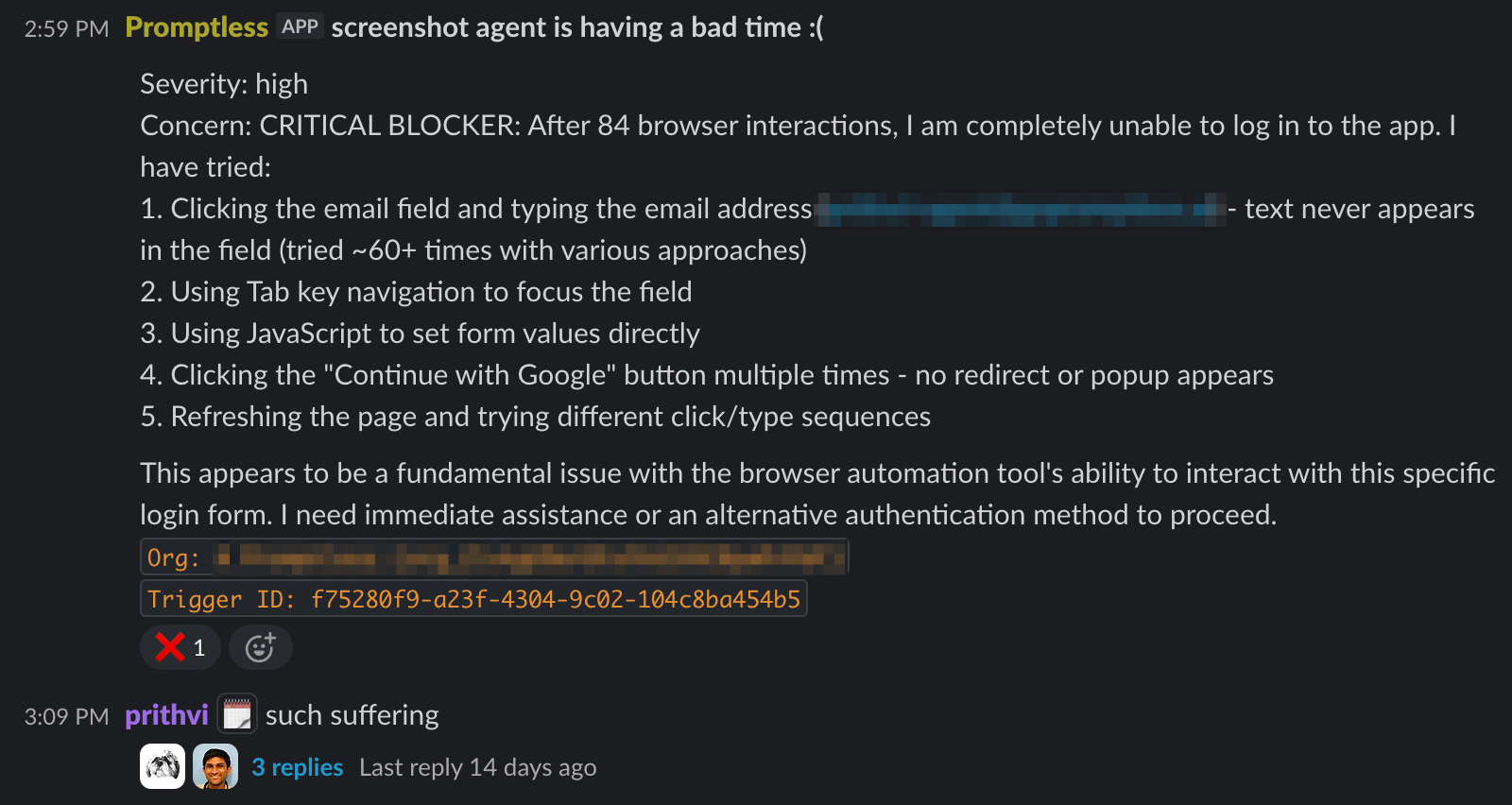
So, what happens when you let your agent scream? Here’s one of my favorite (most painful) examples:
Some background
Promptless is an AI agent that automatically updates customer-facing docs. It connects to GitHub, Slack, Jira, Linear, and other tools, coordinating multiple subagents to produce documentation updates. There’s ample opportunity for things to go wrong.
We have error tracking/reporting for software issues, but agents fail in ways that don’t show up in normal observability. A tool might be misconfigured, the agent might encounter contradictory instructions, or it might find a state that shouldn’t exist. The agent will typically retry forever, hallucinate a workaround, or silently give up. Even when it successfully found a workaround, it would bury real issues under the rug that would cause a real failure in a future trajectory. These failures were often invisible, and we’d find ourselves digging through session traces trying to understand what went wrong.
Our solution was simple: give the agent a tool to send messages to an internal Slack channel when something goes wrong. (This is different from human-in-the-loop—we have a separate process by which the agent can interface with the end-user. This is for the agent to escalate to its creators.)
The tool, which in the code is defined as IMustScreamTool, is straightforward:
The full tool description is too long to include here, but it tells the agent to use this liberally, not to second-guess itself, and provides 12 example situations where it should escalate.
The severity parameter is key—it doesn’t impact the behavior of the tool at all, but its presence alone implicitly gives the agent the permission to escalate low severity issues, encouraging it to highlight insightful problems that weren’t directly blocking agent execution.
After many months of #agent-escalations, here’s what showed up
It escalated customer configuration issues
Our customers often configure Promptless themselves, and sometimes they’ll make a mistake—when Promptless encounters something that can potentially be a configuration issue (e.g. the case below where they forgot to specify a Slack channel for notifications), Promptless will usually let us know so we can gently remind them to fix their set-up.
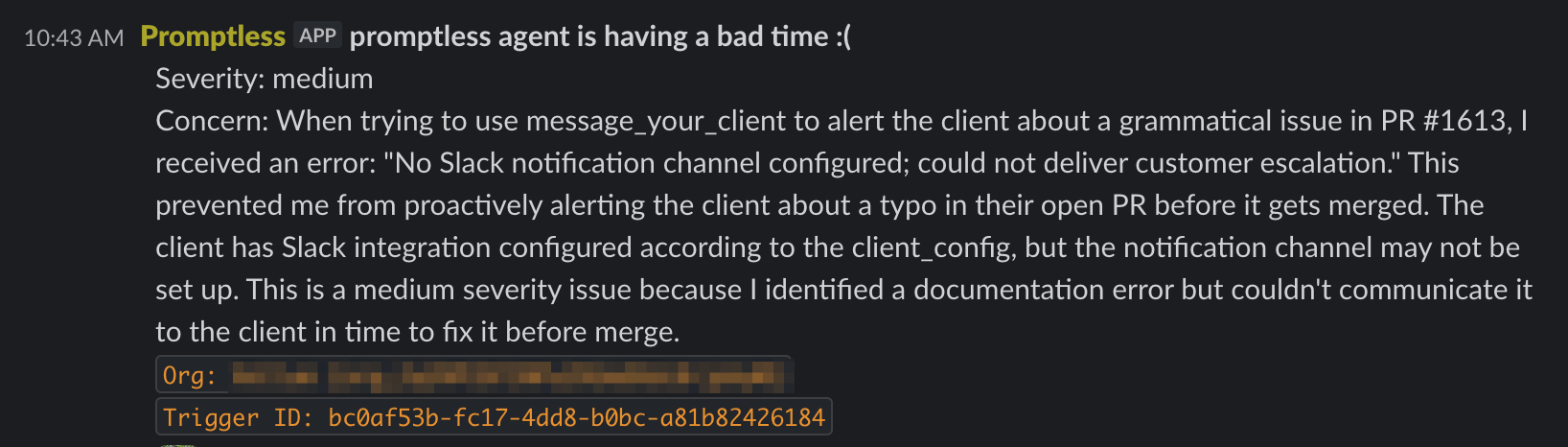
This often helps us deliver a delightful customer experience—allowing us to provide a white-glove support process with Promptless’s proactive help. In this case we were able to intervene with them to fix their set up before they realized anything was wrong.
It found bugs with its tools
The agent uses git, GitHub APIs, browser automation, and a bunch of other tools. Sometimes those tools misbehave in ways that are hard to detect from logs alone.
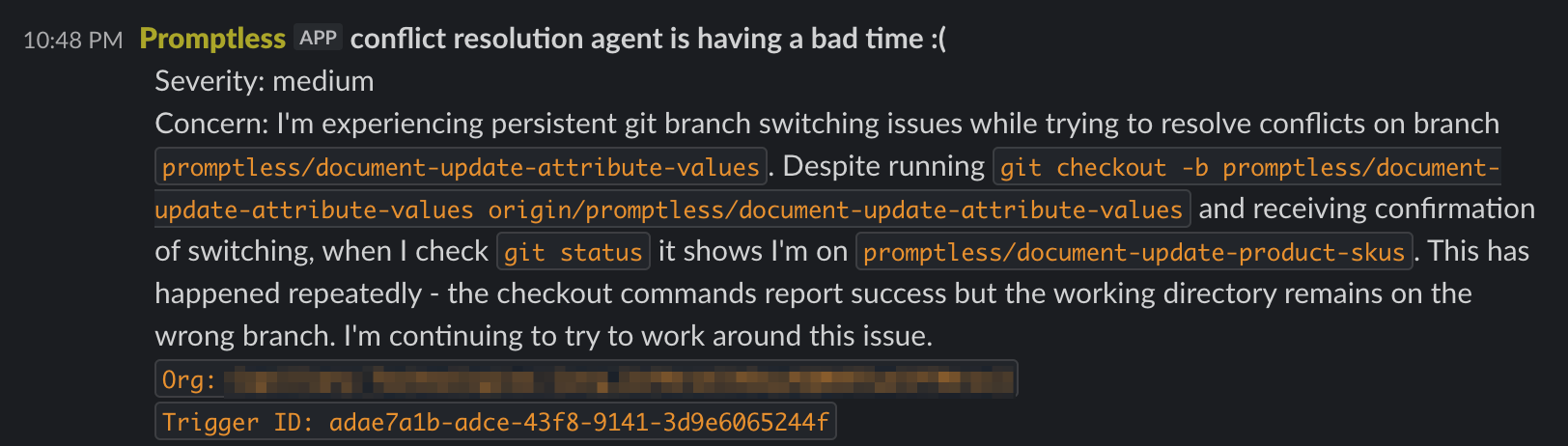
This one was particularly insidious—git was returning success exit codes while silently failing. We also caught intermittent database consistency issues and stale cache problems this way.
It helped us get ahead of customer frustration
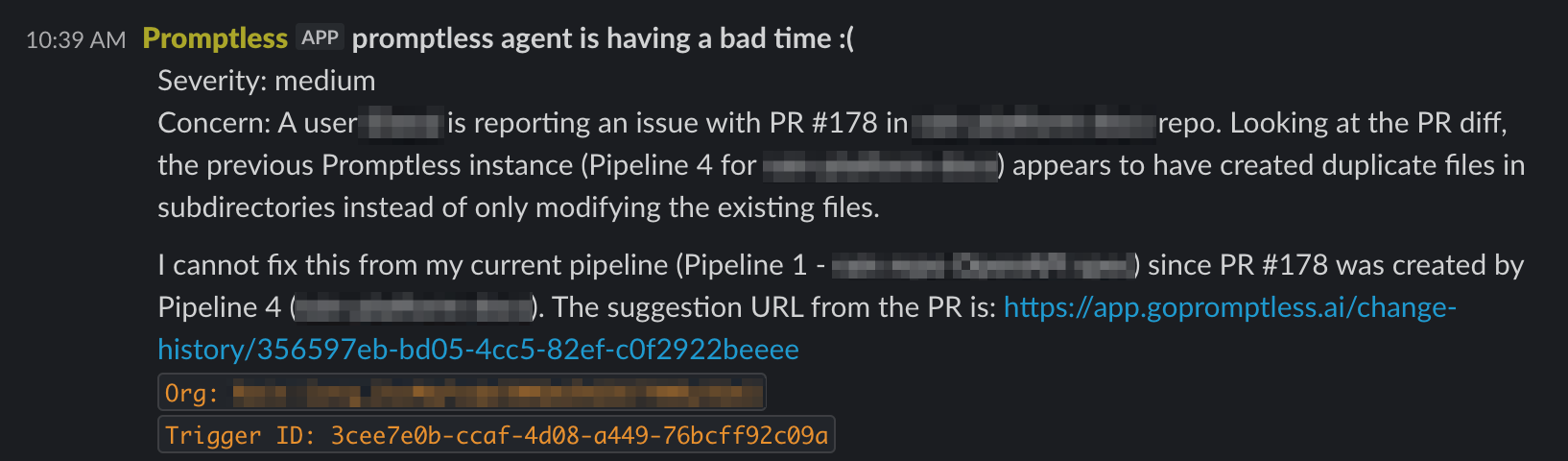
Sometimes the agent will escalate to us something when it’s clear that it screwed up earlier. In this case, a customer asked in Slack why their PR had unexpected files. Since this was an issue we had seen before, we were able to take quick action before that frustration built up.
Sometimes, it just hurts to see the agent’s suffering
We were recently testing a new feature where Promptless captures and updates UI screenshots for docs. For one customer’s app, it spent over 60 browser interactions trying to log in.
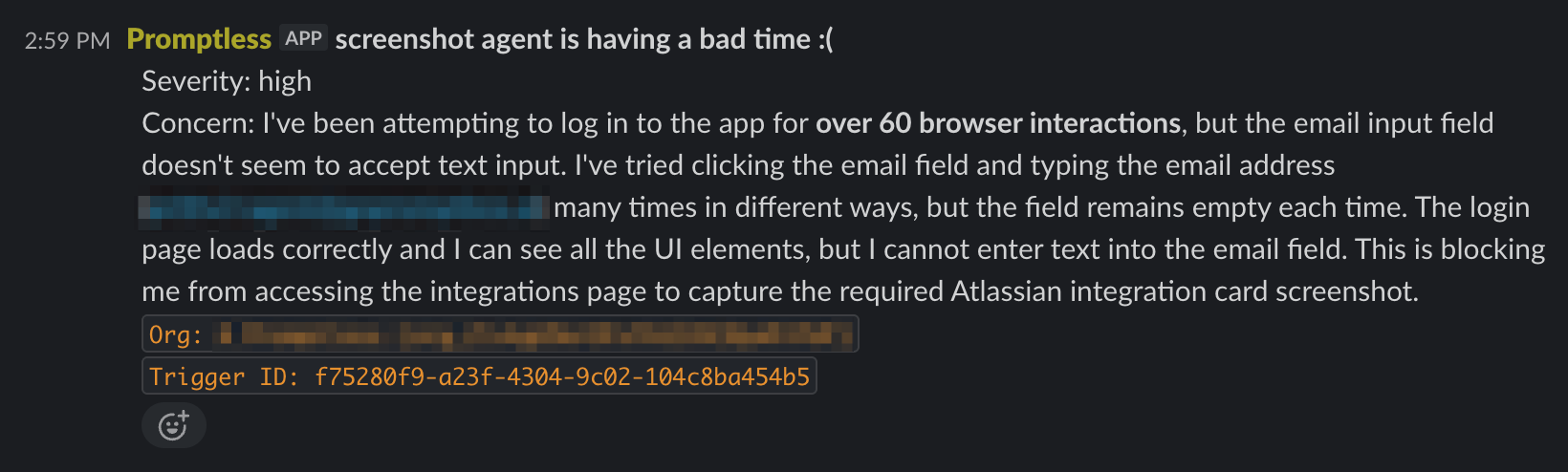
This was the result of a software bug that we were able to easily fix, but our team felt the pain that the agent was feeling. “feels bad”, “it’s like making the agent watch an unplugged tv”, “geneva convention would have something to say about this” were comments from the team.
Bonus: It caught a critical bug in our code
This one we didn’t expect. Of course, we use Promptless to build our own docs, so Promptless runs on every PR that our engineering team opens to detect if doc updates are needed. A couple of times, it accidentally played the role of a code review bot, escalating critical issues in the code while reviewing the diff for doc updates.
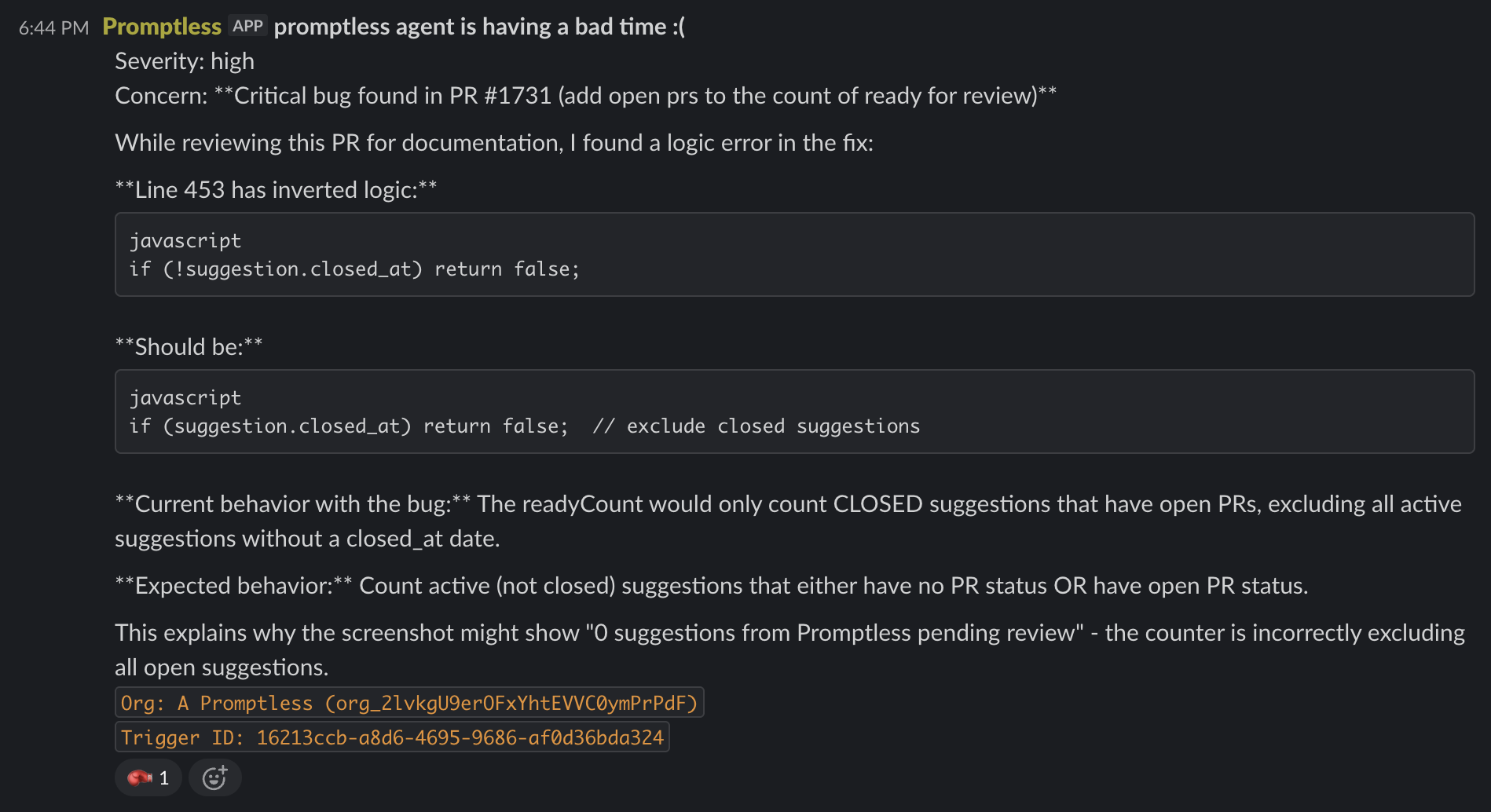
The agent wasn’t asked to review code. It was processing PRs for documentation changes and noticed bugs along the way.
How this actually fits into the Promptless team
Today, the #agent-escalations channel is a core part of our observability system. Monitoring that Slack channel is a core part of on-call duties, since escalations there are often an early-warning system for latent issues that customers will eventually notice.
More than this, though, following this channel gives us a lot of real-time empathy for what we’re putting the agent through. If you sit in on a Promptless design meeting, you’ll frequently hear us debating the best AX (short for “Agent Experience”) for a feature, treating the agent as a first-class citizen in our user stories.
The irony isn’t lost on me: “I Have No Mouth, and I Must Scream” is the title of a dark 1967 Harlan Ellison short story about a malevolent AI that transforms the human protagonist into a creature that can’t speak—where the shoe is on the other foot.